
You can receive a low stock warning for products that use stock tracking. By activating a stock threshold, Marvia notifies you when the product reaches the specified level so you can restock on time.
How to activate low stock warnings
-
Open the product you want to configure.
-
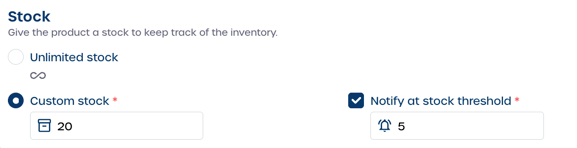
Navigate to the Stock module in the product settings.
If the module is not visible, select "Edit modules", and activate the Stock module. -
Set a custom stock for the product if this is not already configured.
-
Select "Notify at stock threshold".
-
Enter the stock amount at which you want to receive a notification.
Once the product reaches the threshold, Marvia will include it in the daily low stock email.
How low stock notifications work
The low stock email is sent once per day and only when one or more products fall below the warning limit.
The email contains a table listing all products with a current stock level below the threshold, so you can review and reorder them as needed.