
What the Reservations module does
The Reservations module enables reservation based products. You can use it for items, time slots, or resources that need controlled availability. It manages item limits, pricing rules, duration, and the days the item can be booked.
Items and pricing configuration
Items available
This section defines the physical limits of the reservation.
-
Maximum items per reservation
Set the total number of items a user can reserve in a single booking. -
Available items per day
Set how many items are available across all bookings each day.
Note: These values determine how many users can reserve the item at the same time.
Price
This section controls how costs are calculated.
-
Tier price start day
Enter the start day for tiered pricing if your reservation has different pricing for longer durations. -
Tier price calculation
Select how the tier price is calculated such as Per day.
Duration and availability configuration
Duration
This section defines how long a reservation can last.
-
Reservation duration
Choose if the reservation lasts 1 day or Multiple days. -
Minimum number of days
Set the shortest allowed reservation when using Multiple days. -
Maximum number of days
Set the longest allowed reservation when using Multiple days.
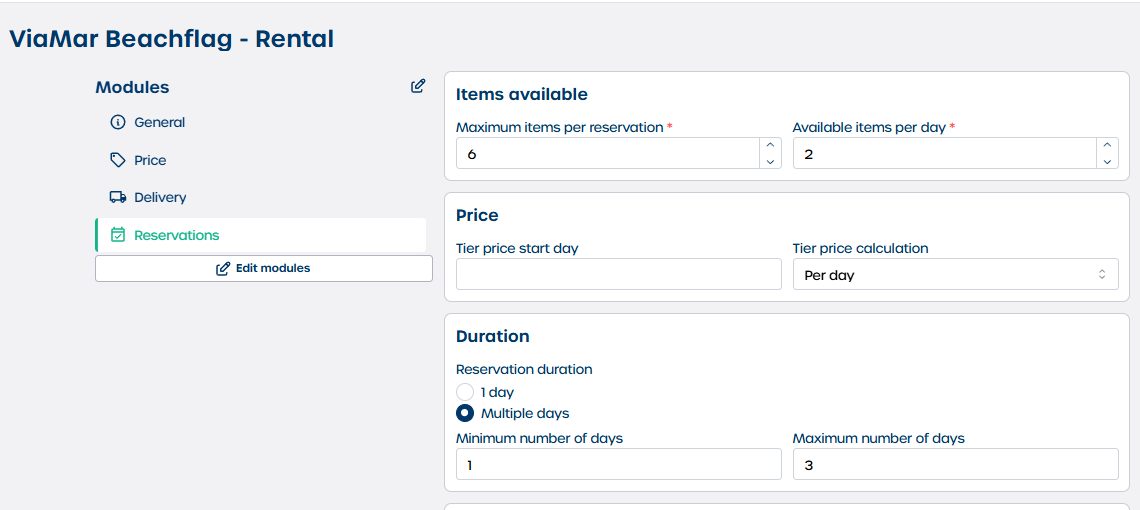
Important: When Multiple days is selected the system counts each day as a separate item.
For correct settings calculate the Maximum items per reservation by multiplying the Available items per day with the Maximum number of days.
Example: A company has two beachflags available. Each beachflag can be rented for a maximum of three days. The Maximum items per reservation is therefore 6.
Time slot
Use this section to define delivery and pickup windows.
-
Hours and Minutes
Set the duration of the time slot. -
Delivery time window
Set the earliest and latest delivery times. -
Pickup time window
Set the earliest and latest pickup times.
Delivery and pickup
This section defines how users receive or return the reserved item.
-
Type
Choose the delivery method such as Supplier delivery. -
Extra delivery or pickup info
Add instructions through the rich text editor.
Availability
Control when the item can be reserved.
-
Available days
Select the days of the week the item can be booked. -
Exclude specific dates
Choose exact dates to mark as unavailable using the calendar picker.
Steps to configure reservations
-
Set item limits
Define Maximum items per reservation and Available items per day. -
Define price rules
Enter a Tier price start day and select a Tier price calculation method. -
Set duration
Select 1 day or Multiple days. If using Multiple days set the Minimum number of days and Maximum number of days. -
Configure time slots
Set delivery and pickup time windows if your reservation requires timed logistics. -
Choose logistics type
Select the delivery or pickup Type and add Extra delivery or pickup info. -
Set availability
Check the Available days and use Exclude specific dates to block particular days. -
Save changes
Click "Save" to apply your settings.