
Navigating and filtering campaigns
-
Navigate to Meta Ads in the sidebar.
-
Enter a term in the Search for a meta ad bar to find campaigns by order number, location name, or Campaign name.
-
Select the date picker to filter ads by start and end dates.
-
Use the dropdown menus to refine your results:
-
Status
-
Campaign
-
-
Select Columns to customize which data fields are shown.
-
Select Export to download the currently visible data.
Note: Filters work together, so you can combine multiple options for precise monitoring.
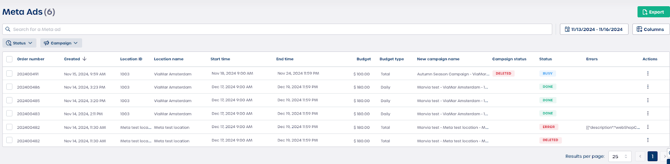
Understanding the campaign data table
Each row represents a single social ad and provides key operational and performance details.
| Column | Description |
|---|---|
| Order number | The identifier of the order that generated the ad. |
| Created | The date and time the ad was created. |
| Location ID and Location name | The internal ID and the name of the location the ad belongs to. |
| Start time and End time | The scheduled dates and times for the ad. |
| Budget and Budget type | The budget assigned to the ad and whether it is a Total or Daily budget. |
| New campaign name | The name sent to Meta when the ad was created. |
| Campaign status | The operational status returned by the Meta platform. |
| Status | The processing status within Marvia, for example DONE or ERROR. |
| Errors | A short description of any issues encountered. |
| Actions | A menu with additional tools and options. |
Caution: The Status field indicates whether an ad successfully completed. Always check this column first when reviewing campaign health.
Troubleshooting and available actions
-
Identify error campaigns
Look for entries where Status is ERROR. Review the Errors column to understand the cause. -
Use the Actions menu
Select the three dots in the Actions column to:-
View details of the ad setup.
-
Debug the ad if the option is available.
-
⚠️ Important: Reviewing and resolving errors quickly ensures your Meta ads continue running without interruption.