
Tracking document generation status
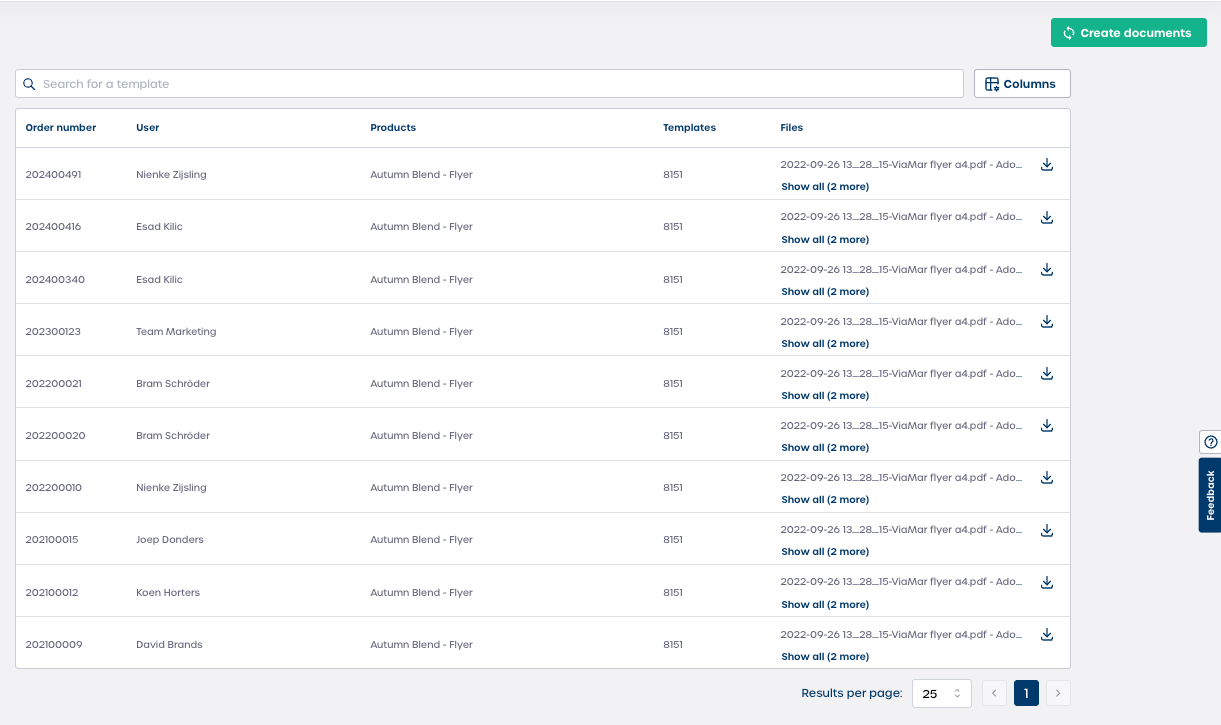
The document generation table shows every file created for an order.
-
Navigate to your Campaign.
-
Select Document generation.
-
Review the table which includes the following fields:
-
Order number: The unique order ID, for example
202400491. -
User: The user who placed the order.
-
Products: The product linked to the generated document, for example Autumn Blend Flyer.
-
Templates: The template ID and version used for the output.
-
Files: Direct links to the generated documents.
-
Note: The table updates automatically as new files are created.
Accessing and downloading files
The Files column is your direct access point to the final output.
-
Select the file name to download the primary generated document.
-
If you see Show all, select it to view all available versions. These may include:
-
A low resolution preview
-
A high resolution print PDF
-
A web ready version of the file
-
-
Select the download icon to save the file to your device.
Caution: Always review the file version before sharing with suppliers to ensure you selected the correct print quality.
Why this feature is useful when designs are not ready
Template based generation keeps your Campaign running smoothly even when final designs are delayed.
Benefits
-
Speed and timeliness
Orders can be fulfilled immediately because files generate as soon as the order is placed. -
Consistency
All documents follow pre approved brand guidelines since they are generated from a controlled template. -
Error management
If you find mistakes in the generated files during the window, you can remove the earlier files easily and generate new ones.
Important: Linking a product to a template ID ensures that no part of the ordering process is blocked by design delays.
Tips
-
Review template versions before your Campaign begins to avoid incorrect outputs later.
-
Use the search bar to locate specific orders quickly when many documents are generated.
-
Download sample files early to verify color, layout, and resolution.