
Finding locations that have not ordered
-
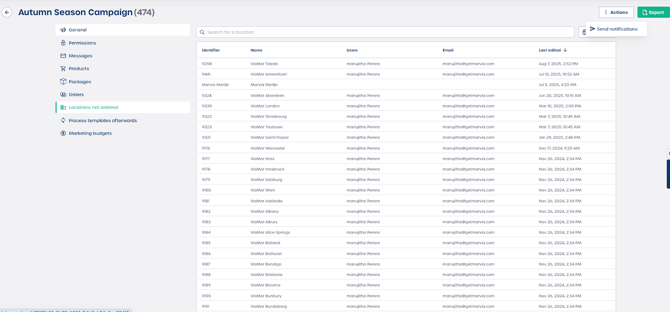
Navigate to the Campaign you want to review, for example "Autumn Season Campaign".
-
Select Locations not ordered.
-
Review the table which shows every location that meets the not ordered criteria. Key fields include:
-
Identifier
-
Name, for example ViaMar Toledo
-
Users, the user who manages the location
-
Email
-
Last edited
-
-
Enter a search term in the search bar to find a specific location or user.
Note: The list updates automatically as locations place orders.
Sending reminder notifications
Once you identify which locations have not ordered, you can send them a targeted reminder.
-
Select Send notifications in the top right corner.
-
Review the pop up titled Send notifications.
-
Enter a subject line for your message.
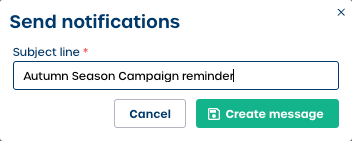
Caution: Make sure your subject line clearly explains the purpose of the reminder.
Composing your reminder message
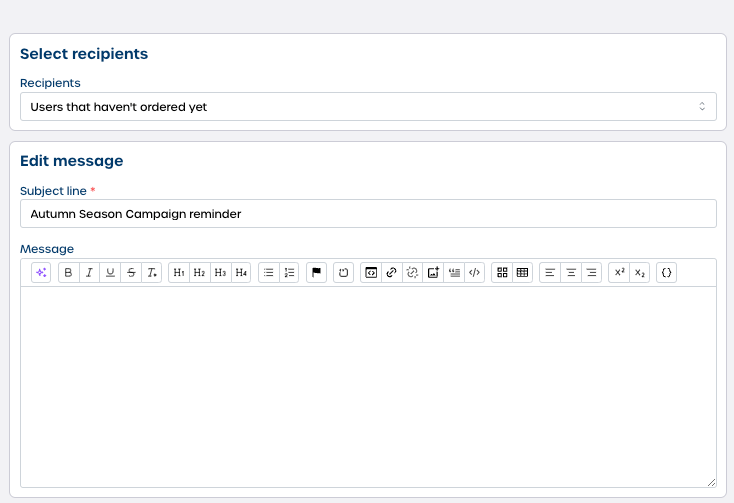
After you confirm the subject line, the message editor opens so you can customize the message.
-
Review the Recipients field. It is already set to Users that haven't ordered yet.
-
Review the Edit message: Subject line field. This confirms the subject you entered earlier.
-
Enter your reminder text in the Edit message: Message field using the rich text editor.
-
Select Send or Schedule to deliver the notification.
⚠️ Important: Scheduled messages help you plan reminders without needing to return to the Campaign later.