
Checkout settings determine how customers move through the ordering process. These settings influence address options, payment behavior, delivery settings, and on-screen messages.
Where to find checkout settings
- Click "Settings" at the bottom of your left menu
- Click "Marketing Shop" and then "Settings"
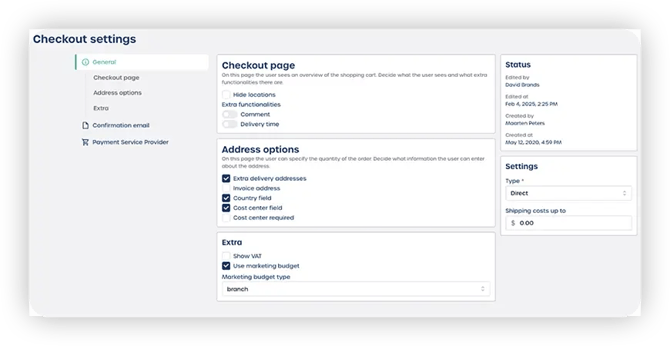
What you can configure
Checkout page
Adjust the layout and options of the checkout flow.
You can configure:
-
Checkout page appearance
-
Whether locations are shown or hidden
-
Comments field
-
Delivery time display
Address options
Control how users enter delivery information.
Settings include:
-
Allow extra delivery addresses
-
Invoice address options
-
Country field visibility
-
Cost center field availability and requirement
-
VAT information display
-
Use of marketing budgets
-
Whether users select a branch during checkout
Confirmation email
Customize the confirmation email sent after checkout is completed.
Payment service provider
Configure the payment gateway used to handle online payments.
Shipping cost settings
Adjust your shipping logic, such as:
-
Free shipping threshold
-
Shipping cost calculation rules